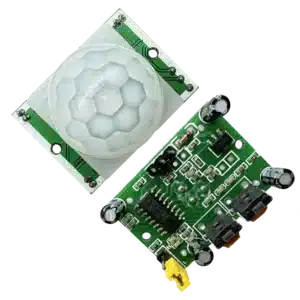


The HC-SR04 Ultrasonic Sensor Module is a popular choice among makers and engineers for distance measurement applications. Whether you’re working with an Arduino or a Raspberry Pi, this sensor can help you measure distances accurately, making it ideal for robotics, automation, and IoT projects. In this blog, we’ll explore how the HC-SR04 works, its applications, and how to integrate it with Arduino and Raspberry Pi for your next project.
What is the HC-SR04 Ultrasonic Sensor?
The HC-SR04 is an ultrasonic distance sensor that uses sound waves to measure the distance to an object. It consists of two main components: a transmitter that emits ultrasonic waves and a receiver that listens for the echo of those waves after they bounce off an object.
How Does the HC-SR04 Work?
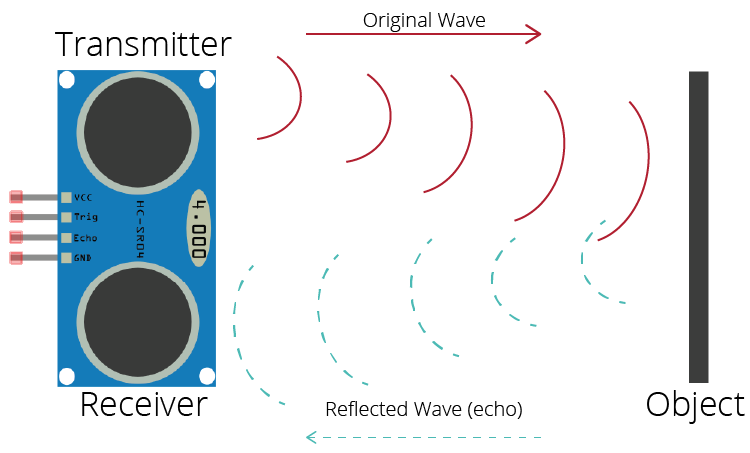
The working principle of the HC-SR04 can be summarized in three main steps:
Trigger Signal: The sensor requires a trigger signal from the microcontroller (Arduino or Raspberry Pi). This trigger initiates the ultrasonic pulse emission.
Ultrasonic Pulse Emission: Upon receiving the trigger, the HC-SR04 emits a series of ultrasonic waves (typically at 40 kHz). These sound waves travel through the air until they hit an object.
Echo Reception: The sound waves bounce back to the sensor, and the HC-SR04 calculates the time taken for the echo to return. This time is then used to calculate the distance to the object using the formula:
Distance=(Time × Speed of Sound)/2
The division by 2 accounts for the round trip of the sound waves.
Applications of the HC-SR04 Ultrasonic Sensor
The HC-SR04 is versatile and can be used in various applications, including:
Obstacle Avoidance in Robotics: Helps robots navigate around obstacles by measuring distances.
Water Level Monitoring: Used in tanks to monitor water levels effectively.
Parking Sensors: Assists in parking by providing distance feedback to drivers.
Distance Measurement: Accurate measurements for various projects in education and industry.
How to Use HC-SR04 with Arduino
Components Needed:
- HC-SR04 Ultrasonic Sensor
- Arduino (e.g., Arduino Uno)
- Jumper Wires
- Breadboard (optional)
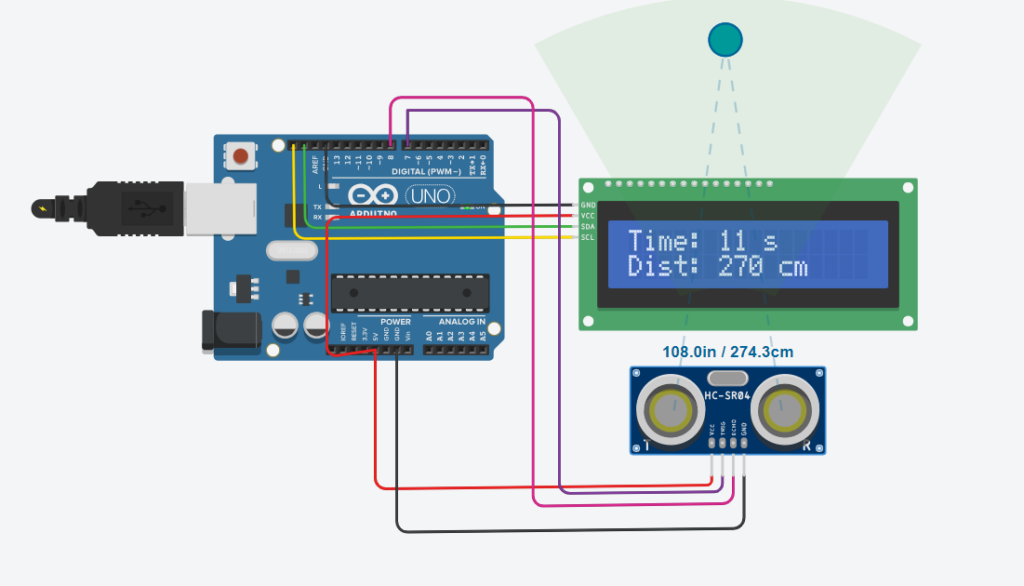
Circuit Connection:
- Connect the VCC pin of the HC-SR04 to the 5V pin on the Arduino.
- Connect the GND pin to the GND pin on the Arduino.
- Connect the TRIG pin to a digital pin 7.
- Connect the ECHO pin to another digital pin 8.
Arduino Code:
#include <Adafruit_LiquidCrystal.h>

// Pins for the ultrasonic sensor
const int trigPin = 7;  // Trigger pin of the HC-SR04
const int echoPin = 8;  // Echo pin of the HC-SR04

long duration;
int distance;
int seconds = 0;

// Initialize the LCD (using the default address of 0x20 for MCP23017 I2C)
Adafruit_LiquidCrystal lcd_1(0);

void setup()
{
  // Initialize the LCD
  lcd_1.begin(16, 2);


  // Set up the ultrasonic sensor
  pinMode(trigPin, OUTPUT);
  pinMode(echoPin, INPUT);
}

void loop()
{
  // Measure the distance using the ultrasonic sensor
  digitalWrite(trigPin, LOW);       // Clear the trigger pin
  delayMicroseconds(2);
  digitalWrite(trigPin, HIGH);      // Send a 10 µs pulse to trigger pin
  delayMicroseconds(10);
  digitalWrite(trigPin, LOW);

  // Read the echo pin and calculate the distance
  duration = pulseIn(echoPin, HIGH);
  distance = duration * 0.034 / 2;  // Convert the duration to distance in cm

  // Display the time (seconds) on the first row
  lcd_1.setCursor(0, 0);
  lcd_1.print("Time: ");
  lcd_1.print(seconds);
  lcd_1.print(" s    ");            // Add spaces to overwrite previous characters

  // Display the distance on the second row
  lcd_1.setCursor(0, 1);
  lcd_1.print("Dist: ");
  lcd_1.print(distance);
  lcd_1.print(" cm   ");            // Add spaces to clear extra characters

  // Blink the backlight every 500 milliseconds
  lcd_1.setBacklight(1);


  // Increment the seconds counter
  seconds += 1;
}
How to Use HC-SR04 with Raspberry Pi
Components Needed:
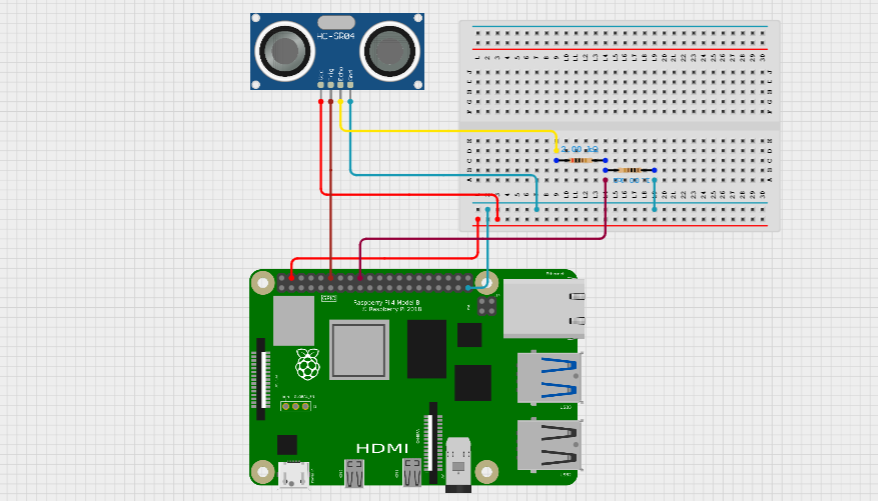
- HC-SR04 Ultrasonic Sensor
- Raspberry Pi (any model with GPIO)
- Jumper Wires.
- Tow resistors 1K ohm and 2K ohm
Circuit Connection:
- Connect the VCC pin to the 5V pin on the Raspberry Pi.
- Connect the GND pin to a GND pin on the Raspberry Pi.
- Connect the TRIG pin to a GPIO pin (e.g., GPIO 23).
- For the ECHO pin, use a voltage divider with the resistors to safely connect it to a GPIO pin (e.g., GPIO 24).
Sample Raspberry Pi Python Code:
import RPi.GPIO as GPIO
import time

# Setup GPIO mode to BCM
GPIO.setmode(GPIO.BCM)

# Define GPIO pins for the ultrasonic sensor
TRIG_PIN = 18  # GPIO pin for Trigger
ECHO_PIN = 24  # GPIO pin for Echo

# Setup the pins as input/output
GPIO.setup(TRIG_PIN, GPIO.OUT)
GPIO.setup(ECHO_PIN, GPIO.IN)

# Function to measure the distance
def measure_distance():
    # Ensure trigger is low for a short duration
    GPIO.output(TRIG_PIN, False)
    time.sleep(2)

    # Trigger the ultrasonic burst
    GPIO.output(TRIG_PIN, True)
    time.sleep(0.00001)  # Send a 10µs pulse to the TRIG pin
    GPIO.output(TRIG_PIN, False)

    # Measure the time between sending and receiving the pulse
    while GPIO.input(ECHO_PIN) == 0:
        pulse_start = time.time()

    while GPIO.input(ECHO_PIN) == 1:
        pulse_end = time.time()

    # Calculate the time difference and convert to distance
    pulse_duration = pulse_end - pulse_start
    distance = pulse_duration * 17150  # Convert time to distance (in cm)
    distance = round(distance, 2)

    return distance

try:
    while True:
        dist = measure_distance()
        print(f"Measured Distance: {dist} cm")
        time.sleep(1)

except KeyboardInterrupt:
    print("Measurement stopped by User")

finally:
    GPIO.cleanup()
Conclusion
The HC-SR04 Ultrasonic Sensor Module is a powerful tool for distance measurement, suitable for various projects with Arduino and Raspberry Pi. With its straightforward implementation and reliable performance, it opens the door to countless possibilities in robotics, automation, and DIY electronics. Whether you’re a beginner or an experienced maker, integrating the HC-SR04 into your projects will enhance your understanding of sensors and microcontroller programming.
For high-quality components and kits, visit electrocomps.in to find everything you need to get started with your Arduino and Raspberry Pi projects!
Thank You